English
 Russian
17.04.2024
Reset Windows Password v14.2
Telegram data recovery, Photo Database and Media Player investigation tools, and some more
20.02.2024
Reset Windows Password v14.1
IP addresses history viewer, fast disk search, local security editor and some more
Reset Windows Password v14.1
IP addresses history viewer, fast disk search, local security editor and some more

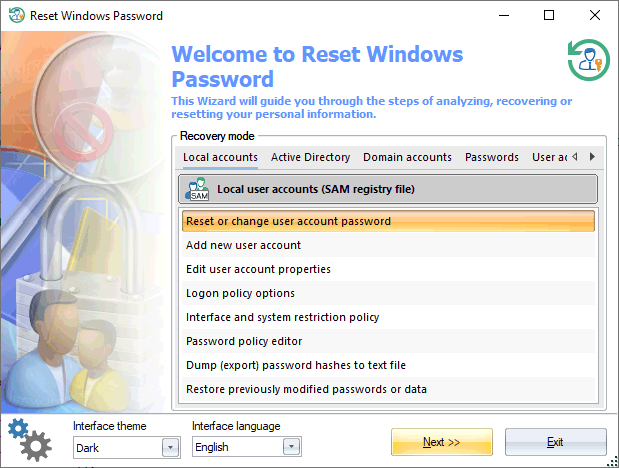
Reset Windows Password screenshotsReset Windows Password was developed for resetting, changing, or recovering Windows logon passwords. For example, when the computer Administrator's password is lost or forgotten. To this day, Reset Windows Password is the most functionally richest solution in its class. The application supports all versions of Windows (based on NT), works with Active Directory, uses artificial intelligence power for recovering passwords instantly to certain accounts, can load hard disk drivers 'on the fly' and demonstrates a number of additional unique features. The program's interface is carried out as a step-by-step wizard. Therefore, the operation process does not seem complicated to even an inexperienced user. For example, resetting an administrator password takes just three simple steps:
First, the program suggests selecting one of the recovery modes: Local accounts - regular user accounts stored in SAM registry, Active Directory - server accounts stored in NTDS.DIT database, Domain accounts - domain user accounts stored in SECURITY registry, Passwords - password recovery tools, User activity - recent user activity, Forensic tools - system investigation and forensic tools, Files and drives - miscellaneous tools to work with files, folders, drives, disk images and so on, Utilities - other features. As you make the selection, the list of operations should be available for the mode.
Passwords
Forensic tools
Files and drives
Utilities
SAM |