Reset Windows Password:
reset Directory Services Restore Mode password
What is DSRM
DSRM (known as Directory Services Repair Mode or Directory Services Restore Mode in versions prior to Windows Server 2012) is a special boot mode of a Windows Server domain controller that is something similar to Safe Mode with Networking, but without Active Directory running. DSRM is used to restore Active Directory from a backup. It is also helpful in different situations and problems with the AD.
To get into DSRM one needs to press the F8 key immediately after BIOS POST screen, but before the Windows logo appears. In Windows Server 2012 and later OSes, there's Advanced Boot Options menu or Windows Recovery Environment for that.
Selecting data source
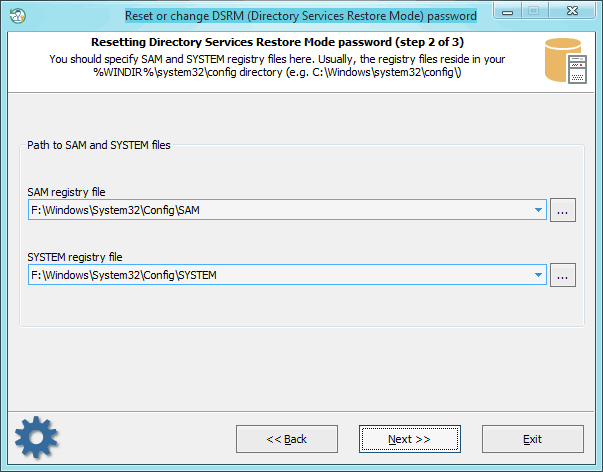
Password recovery process for DSRM account is almost the same as for regular user account. First, you'll have to show the location for SAM and SYSTEM registry files.
Resetting password
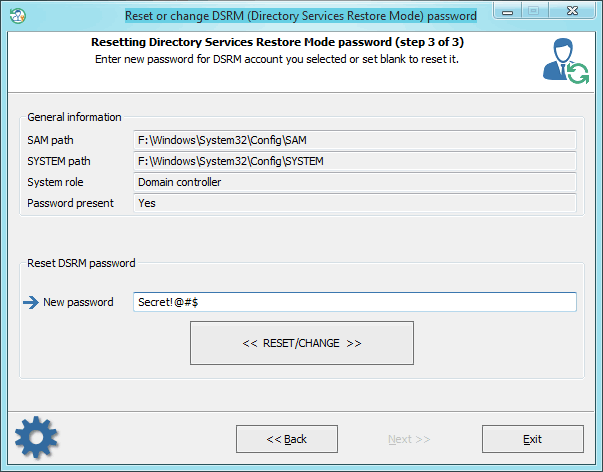
Type in a new password or just set the input field blank if you want to reset it. Then confirm the changes by clicking the 'RESET/CHANGE' button. The program may ask you to create a backup file. You can use the backup file later to roll-back the changes.
 English
 Russian
