Windows Password Recovery - loading hashes from other programs
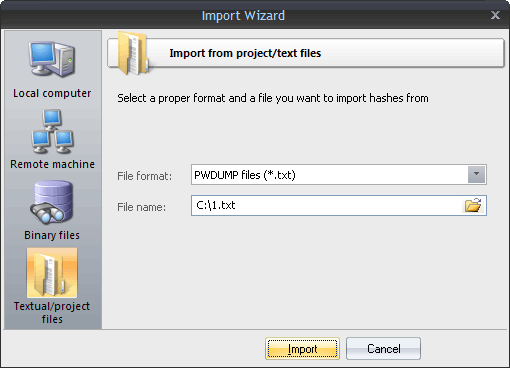
Finally, you can load the hashes to your project by importing them from other applications. The software supports the following formats:
LM/NTLM hashes
- PWDUMP - despite many disadvantages, this is a de facto standard format for storing password hashes. Important note: This format does not fully support national characters. Therefore, some usernames or comments may not display correctly. Windows Password Recovery also supports textual PWDUMP files in UNICODE.
- L0phtCrack (*.lcs) - this file format is used by the LophtCrack software. The program supports all versions of LCS files, beginning with v4.
- .hdt project files, which are used by Proactive Password Auditor (used to be PWSEX) from ElcomSoft. All versions of the format are supported, beginning with v3.
- *.hsh files, which are exported by Proactive System Password Recovery from the same notorious company.
- *.lst hash lists, created by Cain & Abel. Windows Password Recovery supports *.lst files beginning with v.4.9.12. The earlier versions of LST files used the ';' delimiter instead of 'TAB'. Unfortunately, the LST file does not have a marker that specifies the version; therefore, if the LST file is unreadable, you may need to manually replace all the field delimiters with the 'TAB'.
- *.winpsw files, created by WinPassword, from good old LastBit. Supports all versions of WINPSW, beginning with v6.
- SamInside (*.hashes) project files. This format is similar to the textual PWDUMP, but it is more flexible and uses the 0х7f character instead of the colon, which is more reasonable.
- PasswordPro project files (*.hashes). This format is similar to text PWDUMP, except for several changes. It is used by the PasswordsPro product.
- Passcape Universal Configuration Files (*.puc). This container is used in Reset Windows Password software and can contain several different dumps.
- Plain hashes (*.*). Raw hashes in plain text format (32 or 16 characters in a line).
Domain Cached Credentials
- Passcape export/import files (*.peif). This format holds domain cached credentials and is used by Passcape software. For example, in Network Password Recovery.
- Elcomsoft PSPR files (*.dcc). Textual files that contain domain cached credentials.
- CACHEDUMP files (*.txt or *.cachedump). A standard placeholder for domain cached credentials (type 1). This format is obsolete.
- John The Ripper DCC2 files (*.txt). A DCC2 hash format, used in John The Ripper.
Windows Hello PIN
- Hashcat/Elcomsoft/JtR pin hashes. Textual files containing Windows PIN hashes. Usually with *.pin or *.txt extension. Be careful, this format contains private keys that can be used to compromise the owner's security!
All possible hashes
After importing hashes, the program automatically marks all the hashes and launches the preliminary attack. This action is optional and can be disabled in general settings. The option is enabled by default.
 English
 Russian
