Windows Password Recovery - Mask attack
Mask attack is an irreplaceable tool when you know a fragment of the password or have any specific details about it. For example, when you know that the password consists of 12 characters and ends with the qwerty, it is obvious that searching the entire 12-character range of passwords is unreasonable. All that would be required in this case is to recover the first 6 characters of the sought password. That is what the mask attack is for.
In our case, we could define the following mask: %c%c%c%c%c%cqwerty. That means that the program would serially check the following combinations: aaaaaaqwerty .. zzzzzzqwerty. If the original password is 'secretqwerty', it perfectly hits our range.
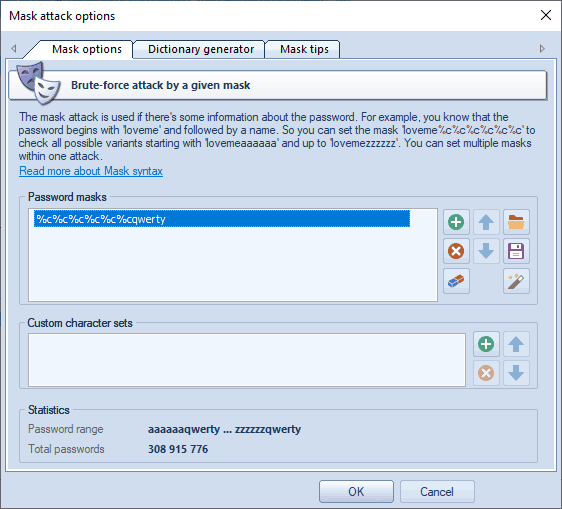
The group of the Password Masks options is aimed to set a mask (or several ones), that will be used to generated passwords by. In most cases, if you know a part of the password, it is enough to specify a single mask. When a mask is selected, the statistics group shows the range of output passwords and the number of passwords generated by this mask. You can save your masks to disk to use it in another project, for example. The program also allows you to generate dictionaries by given masks.
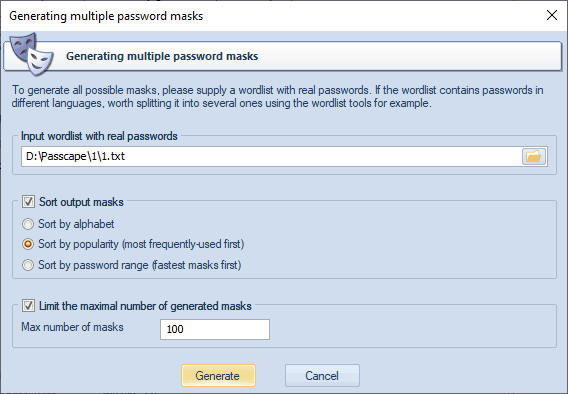
Suppose that you have a list of decrypted passwords and you would like to generate mask templates out of these passwords. Nothing easier. Run the mask generator and show the path to your password list there. You can sort the resulting masks alphabetically, popularity, or by search range (the fastest go first).
The mask syntax is quite trivial and consists of static (unmodifiable) and dynamic (modifiable) characters or sets. Dynamic characters/sets always have a leading %. For example, if you set the mask secret%d(1-100), the program will generate 100 passwords (secret1, secret2: secret100).
Windows Password Recovery supports the following dynamic mask sets:
- %c lower-case Latin characters (a..z), 26 symbols
- %C upper-case Latin characters (A..Z), 26 symbols
- %# full set of special characters (!..~ space), total of 33 symbols
- %@ small set of special characters (!@#$%^&*()-_+= space), 15 symbols
- %? all printable characters with ASCII codes of 32..127
- %* all ASCII characters (codes 1 through 255)
- %d one digit (0..9)
- %d(x-y) numbers between x and y inclusive
- %r(x-y) user-defined characters with serial UNICODE codes between x and y
- %r(x1-y1,x2-y2...xn-yn) set of several non-overlapping sequences of UNICODE characters.
- %[1..9] a character from user-defined charset 1..9
- %[1..9](min-max) user-defined range of variable length (from min to max) to brute-force. You can set up to 9 your own custom character sets.
- %% standalone static character %
When setting %r, keep in mind that the range of defined OEM characters (with character code greater than 127) is generated using the DOS encoding.
Examples:
test%d - will generate password range test0..test9, 10 passwords total
test%d(1980-2007) - test1980..test2007, 28 passwords
test%r(0x0600-0x06FF) - 256 passwords with Arabic character at the end
%#test%# - _test_..~test~, 1089 passwords
admin%1(1-5) - admina .. adminzzzzz, where %1 is user defined charset 1 (a..z)
%1%1%1pin%2%2%2 - aaapin000 .. zzzpin999, %1 is user character set a..z and %2 is second user-defined charset which contains characters 0..9
By switching to Dictionary generator tab, you can generate your own dictionary by a given mask, and save it to disk. However this feature available in the Advanced edition of the program only.
The third tab of the mask options contains a short description of the mask syntax and a couple of simple examples.
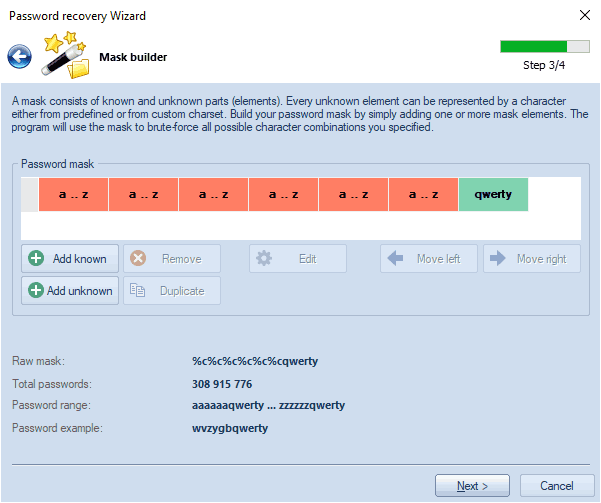
If you feel lost and sick of all these stuff, then use the Mask Builder (in
Password Recovery Wizard) that has a much more user-friendly graphical interface.
 English
 Russian
