 English
 Russian
17.04.2024
Reset Windows Password v14.2
Telegram data recovery, Photo Database and Media Player investigation tools, and some more
20.02.2024
Reset Windows Password v14.1
IP addresses history viewer, fast disk search, local security editor and some more
Reset Windows Password v14.1
IP addresses history viewer, fast disk search, local security editor and some more

Windows CardSpace - decrypting InfoCard public data
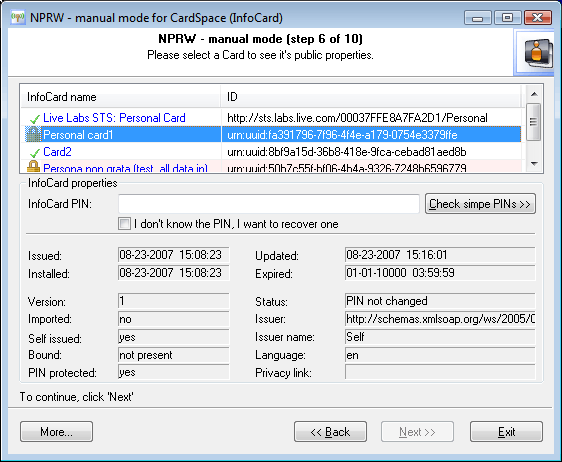
Decrypting InfoCard public data. Selecting Cards.If the previous steps of the Wizard have been completed successfully, you should be looking at the picture like this one (see the figure). At the top of the picture, you should see the list of decrypted InfoCard with the names and uniform identifiers. A bit below that are the selected card's properties (to view a card's properties, select the card on the list).
A list against the card's name may have icons that indicate whether the card is protected with a password. The meanings of the icons are: |
 - Card not protected with PIN. Private data, i.e. claims, can be decrypted. The 'Next>>' button will be enabled.
 - Card locked with PIN, but it has been found. Therefore, like in the first case, firmly move on to the Wizard's final step - the decryption of claims.
 - Card locked with PIN. The 'Next>>' button becomes disabled. The recovery of the private data is impossible; however, you can try to