Close

http://www.passcape.com

Password Recovery Software

The best programs to recover lost and forgotten passwords
Control panel
Home > Products > Windows network passwords recovery > Network Password Recovery Wizard > Screenshots > Decrypting Windows CardSpace > Launching the selected attack on InfoCard PIN
Launching the selected attack on InfoCard PIN
04.05.2012
Windows Password Recovery v5.1
Now with GPU support
09.04.2012
New blog post
Using passwords from the Bible
13.03.2012
DPAPI secrets
New article has been submitted
20.02.2012
Auditing 32 mln. RockYou passwords
Brief analysis of 32 mln. passwords

Articles and video

You may find it helpful to read our articles on Windows security and password recovery examples. Video section contains a number of movies about our programs in action

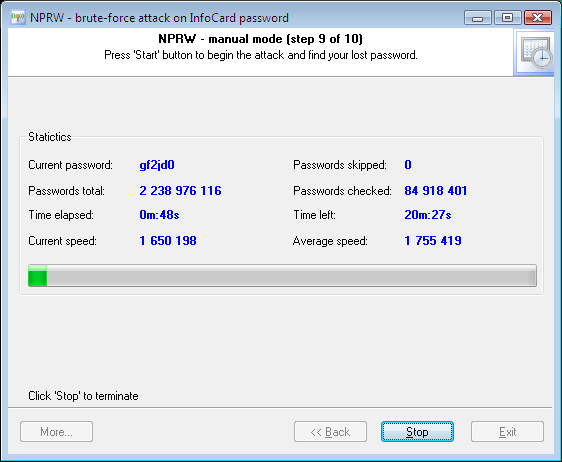
Windows CardSpace - launching the selected attack on InfoCard PIN


The last step of the password recovery wizard launches the attack you have selected and gathers and displays its statistics.

Recovering InfoCard PIN

Please keep in mind that if you have selected a pretty long word in the base-word attack, the preparation to the attack may take some time.

Later, if the PIN you were looking for is found, the program will notify you of that with the alert you have specified and copy the password to clipboard.

At this moment, the speed of the brute-force attack is ~4 mln. passwords/sec on a modern computer.

So, if the luck has shined, and the PIN has been recovered, you can move on to the recovery of private data of the selected InfoCard.


Print   E-mail