Network Password Recovery Wizard Screenshots:
network connections passwords
This is what recovered connections passwords look like (auto mode):
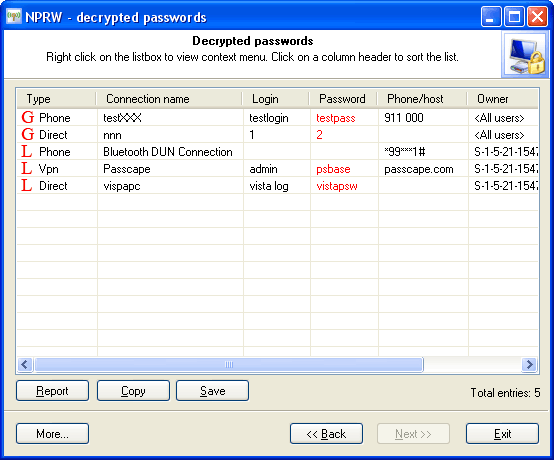
NPRW supports recovering passwords for the following types of connections:
Phone - Phone line, for example, modem, ISDN, X.25.
Vpn - Virtual Private Network.
Direct - Direct serial or parallel connection
Internet - Connection Manager connection.
Broadband - Broadband connections, e.g. DSL.
To recover network connections passwords manually, you will need to have at least two Windows registry files: SYSTEM and SECURITY. They are located in the C:\Windows\system32\config folder of your local computer.
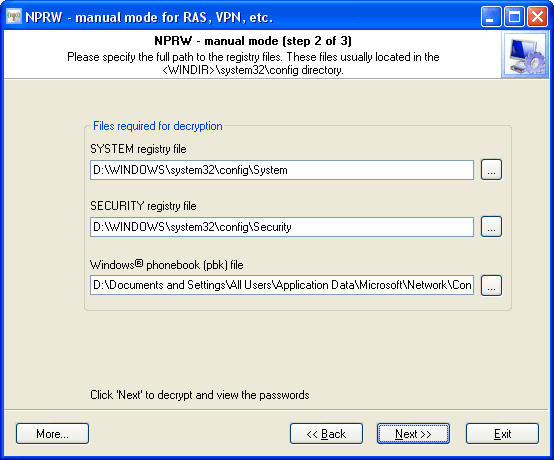
To recover the data in full, you will also need the PhoneBooK file. This file is normally stored in the folder C:\Documents and Settings\All Users\Application Data\Microsoft\Network\Connections\Pbk\rasphone.pbk. Recovering passwords without the phonebook file is also possible. In this case, only logins and passwords will be recovered, missing the connection names, phone numbers, etc.
 English
 Russian
