Opera Password Recovery Screenshots
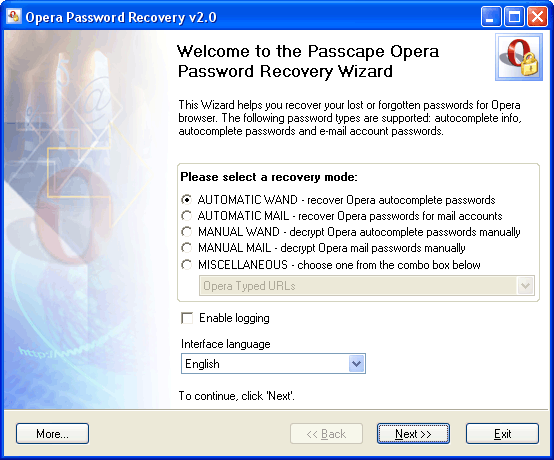
The main window of the program allows you to choose a recovery mode:
- AUTOMATIC WAND - select this mode to recover all found Opera autocomplete passwords
- AUTOMATIC MAIL - automatically recover Opera e-mail account passwords
- MANUAL WAND - decrypt Opera autocomplete passwords manually
- MANUAL MAIL - recover e-mail (as well as chat, news etc.) account passwords manually
- MISCELLANEOUS - new additional features to view and organize Opera cookies, favorites, disk cache, files history, visited URLs history, and AutoComplete URLs. Available over v2.0. Screenshots are here. OPR v3.0 now goes with Master Password Recovery engine. Take a look at some Master Password recovery screenshots.
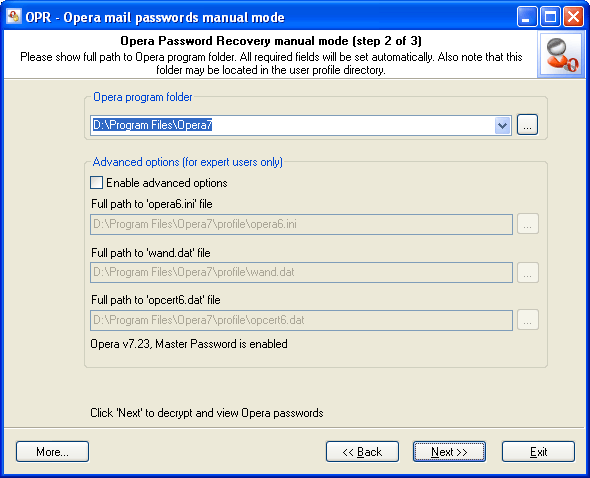
The Opera Password Recovery manual mode allows you to set various recovery options manually. Select the Opera program folder from the drop-down list shown below and all other options will be set automatically.
To recover WAND autocomplete passwords with the Master Password enabled (the Opera program folder is unknown as well), please follow the steps shown below:
- Set 'Enable advanced options'
- Specify the full path to your Opera wand.dat file
- Specify the full path to the opcert6.dat file. It is usually located in the same directory.
- Click the 'Next' button and enter your Master Password
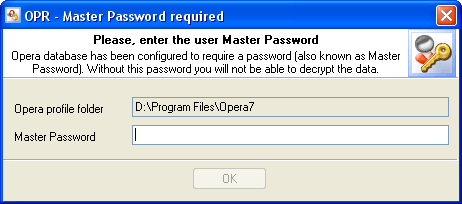
Sometimes it is possible to recover wand passwords even if the wand.dat file is partially corrupted (OPR 'smart force' method). All you need is to do is hold down the Shift+Ctrl keys when clicking the 'Next' button. In that case, all the decrypted data will be shown the way it is actually stored in the database (string by string). However, some data will not be decrypted if the user Master Password is unknown or invalid.
The final dialog contains found and decrypted passwords.
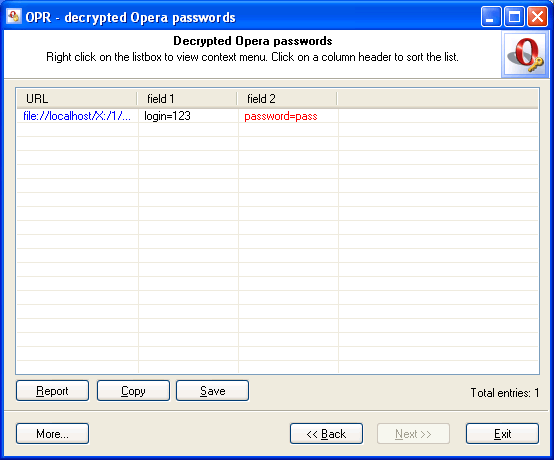
Decrypted URLs are highlighted in blue. You can open the location by double-clicking it. Password fields are marked with red. All Wand AutoComplete fields consist of two parts: ID=DATA. Where ID is the name of an AutoComplete field on a web page and DATA is textual data. Such a structure allows the Wand manager to fill out the entire web page form with a single click.
 English
 Russian
