Close

http://www.passcape.com

Password Recovery Software

The best programs to recover lost and forgotten passwords
Control panel
Home > Products > Password recovery for popular browsers > Mozilla Password Recovery > Cookie explorer
Mozilla/Thunderbird/Firefox Password Recovery - cookie explorer
29.07.2010
Windows Password Recovery Beta2
New beta of Windows Password Recovery
02.07.2010
Windows Password Recovery Beta1
Windows Password Recovery - new utility to recover and audit Windows account passwords.
04.06.2010
Passcape Win CD Keys update
PWCDKEY can now extract keys for 1000+ programs
02.06.2010
Windows Mail Password Recovery update
The program can decrypt Windows Live SSO passwords now.

Articles and video

You may find it helpful to read our articles on Windows security and password recovery examples. Video section contains a number of movies about our programs in action

Mozilla/Thunderbird/Firefox Password Recovery - Cookie Explorer

A cookie is a piece of text stored on your computer by a web server. This value of a variable that a website sets. If the lifetime of this value is set to be longer than the time you spend at that site, then this string is saved to file for future reference. Cookies were developed to help users to navigate visited sites. But often cookies criticized for weak security and inaccurate user identification. You can read more information about cookies from Microsoft or Wikipedia Web sites.

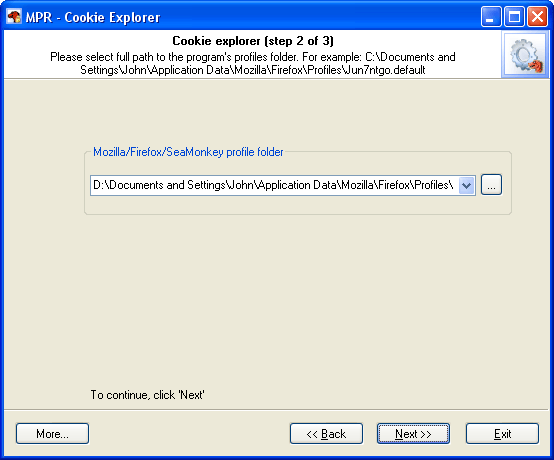
Cookie Explorer is a new feature that was added to MPR v2.4 to help you to navigate through the Mozilla/Firefox/SeaMonkey stored cookies. To start viewing cookies, you'll have to show a full path to your Mozilla/Firefox/SeaMonkey profile folder (a folder with the cookie.txt file in it).
Typically this path should look like this:
Mozilla or SeaMonkey: C:\Documents And Settings\%USERPROFILE%\ApplicationData\Mozilla\default\%PROFILEFOLDER%
Firefox: C:\Documents And Settings\%USERPROFILE%\ApplicationData\Mozilla\Firefox\profiles\%PROFILEFOLDER%

Some examples:

  • C:\Documents And Settings\John\ApplicationData\Mozilla\Firefox\profiles\js786alk.default
  • C:\Documents And Settings\kate\ApplicationData\Mozilla\default\6sn16oa4.slt

Selecting Firefox cookies source profile


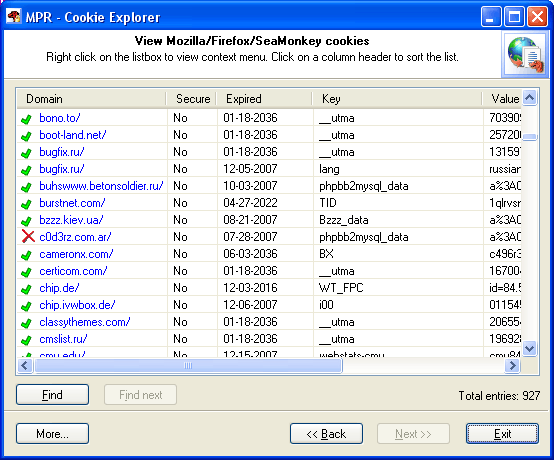
After selecting a profile folder from the drop down list, click Next to view the cookies. Firefox cookies


Print   E-mail