Close

http://www.passcape.com

Password Recovery Software

The best programs to recover lost and forgotten passwords
Control panel
Home > Information > FAQ > How to download and install a program using Internet Explorer
How to download and install a program using Internet Explorer
19.01.2012
Windows Password Recovery v4.0.6
The program's major update with a set of brand-new features
30.12.2011
Reset Windows Password
Hebrew translation were added
01.12.2011
Reset Windows Password v1.4.7
General update of Reset Windows Password.
26.10.2011
Windows Password Recovery v3.3.1
Online recovery, rainbow table generator, new mutation ...

Articles and video

You may find it helpful to read our articles on Windows security and password recovery examples. Video section contains a number of movies about our programs in action

Download and Install Tips (using Internet Explorer)

Follow these easy steps to get started.

Download tips for Firefox, K-Meleon, Mozilla, SeaMonkey
Download tips for Opera browser


1

Step 1  

2

Step 2
 

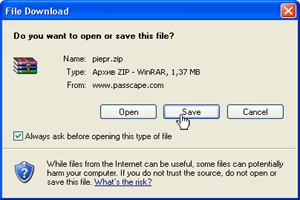
Select a program you need and click download link. Confirm downloading by pressing Save button.


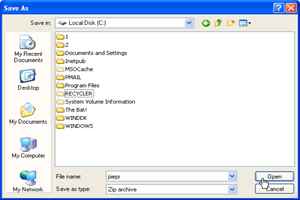
    Select a location where to save the file, eg. C:\


3

Step 3  

4

Step 4
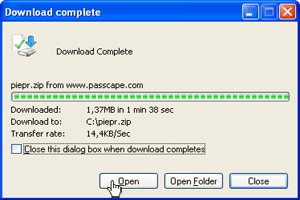
  Click Open upon successful download.


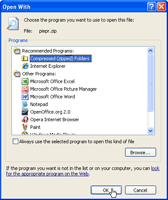
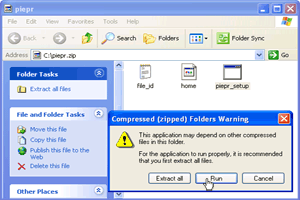
    Open zip archive using Compressed (zipped) Folders, if no programs were associated with *.zip files.


5

Step 5  

6

Step 6
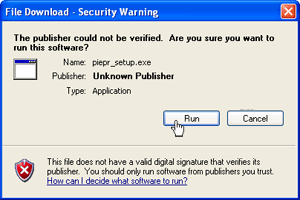
  Double-click on setup.exe icon and select Run button to launch the program setup wizard.


    If Unknown publisher security warning appears, click Run to proceed.


7

Step 7  

8

Step 8
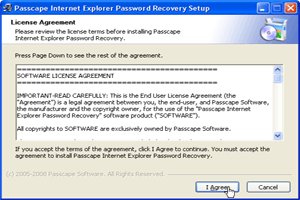
  Follow the setup wizard steps.


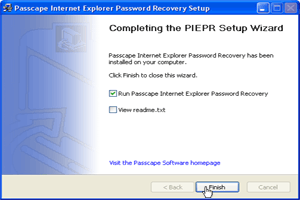
    Set on Run ... check-box and click Finish to launch the program.


Print   E-mail